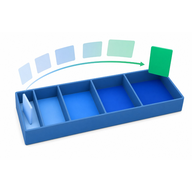
Cram in MyLeitnerBox is extra practice. It helps you rehearse cards without treating every answer like an official Leitner review.
There are two kinds:
- Cram mode — optional practice offered after you finish a normal review
- Custom Cram — sandbox practice you can start anytime from the box page
Short answer:
- Start review = real Leitner progress
- Cram / Custom Cram = practice (with important caveats below)

What is the difference between Review, Cram, and Custom Cram?
| Mode | When you use it | Does it change Leitner progress? | Counts as official daily review? |
|---|---|---|---|
|
Start review |
When cards are due |
Yes — Correct/Wrong move cards through sections |
Yes |
|
Cram mode (post-review) |
Right after a finished standard review |
No promotion to Section 2 — practice for Section 1 prep |
No (it is optional extra practice) |
|
Custom Cram |
Anytime from the box page |
No — sandbox only |
No |
So if someone asks: “Does cramming promote my cards?”
→ No. Cram answers do not promote cards the way a normal review does.
What is Cram mode (after a review)?
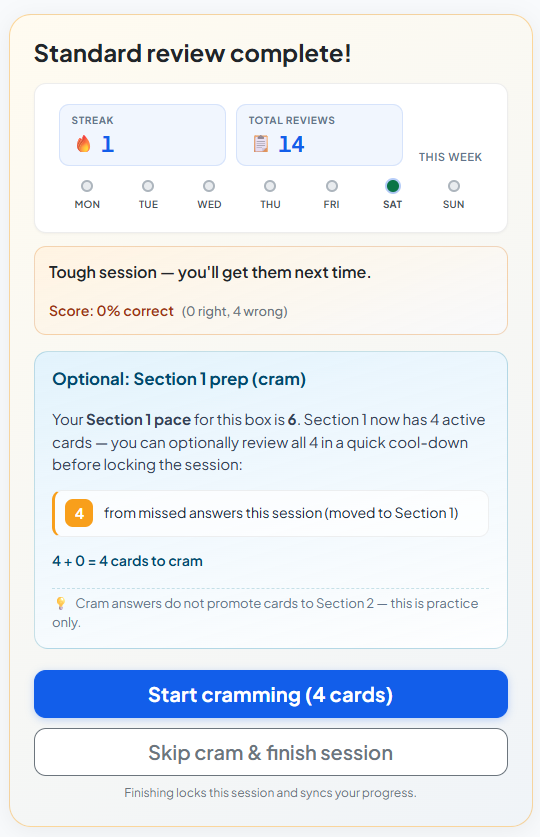
After you complete a standard review session, MyLeitnerBox may offer:
Optional: Section 1 prep (cram)
This is a cool-down / buffer practice focused on Section 1-related cards (for example cards that were missed, newly injected from the queue, or already in S1).
On that screen you will see options like:
- Start cramming (N card/cards)
- Skip cram & finish session (or Finish session if there is nothing to cram)
A key on-screen note is:
Cram answers do not promote cards to Section 2 — this is practice only.
How does Cram mode work during the session?
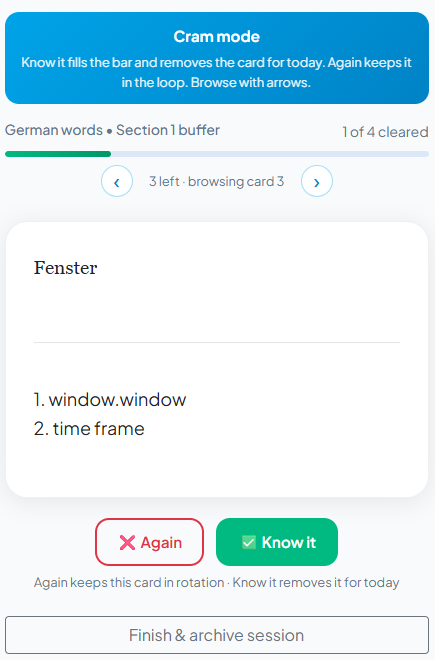
Inside Cram mode:
- You see the front of the card.
- Tap/click to reveal the back.
- Grade yourself with:
- Again — keeps the card in the cram loop
- Know it — fills progress and removes the card for today/this cram run
You’ll also see browsing controls (arrows) and progress such as N of M cleared or cards left.
When finished, use Finish & archive session.
What is Custom Cram?
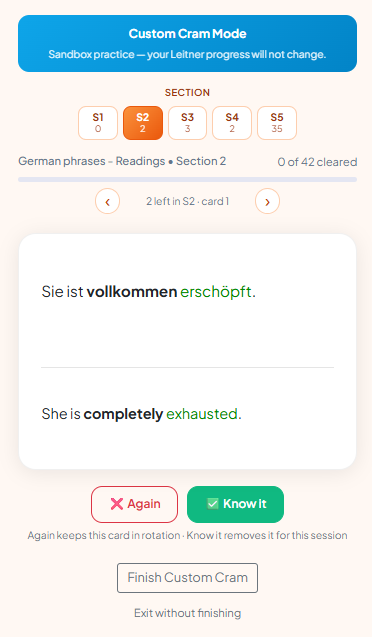
Custom Cram is sandbox practice you start yourself from the box page.
- Open your box (Boxes → My Boxes → [box]).
- Click Custom Cram (shown with a count, e.g. 🔥 Custom Cram (12)).
- Choose a Section (S1 … S5).
- Practice with Again / Know it.
- End with Finish Custom Cram, or leave with Exit without finishing.
On-screen messaging makes the rule explicit:
Sandbox practice — your Leitner progress will not change.
And when done:
No Leitner progress was changed — this was sandbox practice.
When should I use each one?
Use normal Start review when:
- You want real spaced-repetition progress
- You care about streaks / completion stats / analytics unlock
- Cards are due today
Use post-review Cram when:
- You just finished review and want a little extra Section 1 reinforcement
- You want practice without promoting cards further
Use Custom Cram when:
- You want to practice a specific section (S1–S5) anytime
- You want a rehearsal before an exam/conversation
- You do not want to change Leitner positions
Important caveats (read this carefully)
1) Custom Cram can lock your next official review
If you click Finish Custom Cram while your official daily review is still due, MyLeitnerBox may show:
- Review Locked with a countdown (about 2 hours)
- Hint text like: Short-term memory cooling down…
This is intentional: spaced repetition works better when you don’t immediately overwrite short-term memory with more drilling of the same material.
If you do not want the lock: choose Exit without finishing instead of finishing Custom Cram.

2) Custom Cram does not replace your daily review
Custom Cram is not an official review day.
Streaks and analytics unlock are based on completing real reviews (for analytics: a full Mon–Sun review week pattern, as described in your Analytics guide).
3) You can’t cleanly run both at once
If a review is already in progress and you try to start Custom Cram, you may see a conflict like:
- Review already in progress
- Options such as abandon review and start cram, or continue review
Finish or exit one session before starting the other.
4) Custom Cram needs cards
If the button shows Custom Cram (0) and is disabled, add cards first. Tooltip: Add cards to this box to use Custom Cram.
5) Post-review cram is optional
You can always Skip cram & finish session. Skipping is fine.
Can Cram help me learn faster?
Cram can help with short-term confidence and rehearsal.
It is not a shortcut to graduate cards through Sections 2–5.
For long-term memory, keep this order:
- Do Start review when cards are due
- Use Cram / Custom Cram only as extra practice
- Activate new cards gradually from Queued so reviews stay manageable
Quick answers for common questions
What is Cram mode in MyLeitnerBox?
Optional practice after a standard review, focused on Section 1 prep, that does not promote cards to Section 2.
What is Custom Cram?
Anytime sandbox practice by section (S1–S5) that does not change Leitner progress.
Does Custom Cram move cards between sections?
No.
Does finishing Custom Cram lock Start review?
It can — for about 2 hours — if an official review was still due when you finished Custom Cram.
How do I avoid the review lock?
Use Exit without finishing, or finish your official Start review first (and use post-review cram if offered).
Is cramming the same as reviewing?
No. Review updates the Leitner schedule. Cram is practice.
Where do I start Custom Cram?
On the box page, next to Start review, click Custom Cram.
Where do I start post-review Cram?
It appears automatically after you complete a standard review, as Optional: Section 1 prep (cram).
