Dana is the in-app help assistant inside MyLeitnerBox.
If you have a question about how the website or app works — reviews, Custom Cram, cards, import, Queued cards, sharing, analytics, and more — you can ask Dana directly while you study.
Short answer:
Dana is MyLeitnerBox’s built-in help chat. It answers product questions from curated help knowledge. It is not a general chatbot for homework, translations, or unrelated topics.
What is Dana?
Dana is MyLeitnerBox’s help assistant.
- Name shown in the UI: Dana
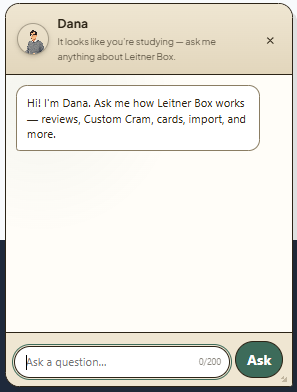
- Greeting: “Hi! I'm Dana. Ask me how Leitner Box works — reviews, Custom Cram, cards, import, and more.”
- Purpose: help you understand and use MyLeitnerBox features quickly
Dana is available on the website (floating chat) and in the mobile app (Ask Dana button), when enabled for your language/settings.
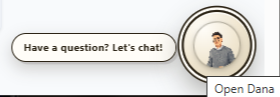
How do I open Dana on the website?
- Look for the floating Dana avatar (usually near the bottom of the page).
- Click Have a question? Let's chat! or use the Open Dana button.
- Type your question in Ask a question…
- Click Ask.
- Close the panel with × / Close when you are done.
You can also resize the Dana panel by dragging its edges or corners.
How do I use Dana in the mobile app?
- On Home or Boxes, tap the floating Ask Dana button.
- Ask your question and tap Ask.
- To hide Dana temporarily: long-press the button, or tap × (Hide Dana).
- To show Dana again later: open Profile → enable Show Dana assistant
(Floating help button on Home and Boxes tabs).
What can I ask Dana?
Yes — ask Dana about MyLeitnerBox features, for example:
- How the Leitner method works in MyLeitnerBox
- Creating boxes and adding flashcards
- Importing cards (Anki, Quizlet, CSV, Excel, and more)
- Active / Queued / Retired cards
- Starting a review session
- Cram mode and Custom Cram
- Sharing boxes / adding a shared box
- Review Analytics
- Text-to-Speech, word auto-fill, account/profile basics
- Where to find Guides / documentation
Good example questions
- “How do I import a CSV?”
- “What does Queued mean?”
- “What is Custom Cram?”
- “How do I share my box?”
- “Why is Start review locked?”
What can Dana not do?
Dana is product help, not a general AI tutor.
Dana is not designed to:
- Write your flashcards for you
- Translate arbitrary text like a full translation tool
- Answer unrelated general-knowledge questions
- Access your private account data beyond answering help topics
- Replace the longer step-by-step Guides pages
If your question is outside MyLeitnerBox help, Dana may ask you to rephrase or may not have an answer yet.
How does Dana answer questions?
Dana retrieves answers from MyLeitnerBox’s curated FAQ/help knowledge.
When you ask something:
- Dana thinks (Dana is thinking…)
- If there is a clear match, Dana answers directly
- If several topics are close, Dana may offer choices such as:
- Close match
- Possible match
- If nothing fits well, Dana may say it doesn’t have an answer yet and ask you to rephrase
Tip for better answers: keep the question short, specific, and about one feature.
Are there limits when chatting with Dana?
Yes. Important limits:
| Limit | What it means |
|---|---|
|
Max question length |
About 200 characters per question |
|
Rate limits |
If you ask too quickly, you may need to wait briefly |
|
Language |
Dana help is often available first in English (depending on current settings) |
|
Scope |
Best for MyLeitnerBox how-to questions |
|
Availability |
The website widget can be enabled/disabled by configuration; on mobile you can hide/show Dana in Profile |
If you hit a limit, wait a moment, shorten the question, or open the Guides pages for a full walkthrough.
Dana vs Guides — which should I use?
Use both — they complement each other.
| Need | Best place |
|---|---|
|
Fast “how do I…?” while studying |
Ask Dana |
|
Full step-by-step manual with screenshots |
Guides (Boxes menu → Guides, or /about/) |
|
Deep feature walkthrough (import, cram, analytics) |
Guides |
|
Quick clarification of a button/term |
Dana |
Dana is great for quick answers.
Guides are better for complete procedures.
How do I get the best answers from Dana?
Yes — wording matters.
Do
- Ask one clear question at a time
- Use product words: Queued, Custom Cram, Import, Shared Boxes, Review Locked
- Rephrase if Dana shows no good match
Don’t
- Paste very long text (200-character limit)
- Mix several unrelated questions in one message
- Expect Dana to act like ChatGPT for non-app topics
Better
- “How do I move cards from Queued to Active?”
Weaker
- “I imported stuff and now I’m confused about everything on the page and also analytics and sharing”
Can I turn Dana off?
Yes (especially on mobile).
- Hide from the floating button: long-press / Hide Dana
- Turn back on in Profile → Show Dana assistant
On the website, close the panel anytime with ×. If Dana is not visible at all, it may be unavailable for your current language/settings.
Quick answers for common questions
What is Dana in MyLeitnerBox?
Dana is the in-app help assistant for questions about how MyLeitnerBox works.
Where do I find Dana?
On the website: floating chat (Have a question? Let's chat! / Open Dana).
In the app: Ask Dana on Home/Boxes.
Can Dana help me import flashcards?
Yes — ask things like “How do I import a CSV?” or “How do I import from Anki?”
Is Dana a free-form ChatGPT replacement?
No. Dana answers from curated MyLeitnerBox help knowledge.
Why didn’t Dana answer my question?
The question may be too broad, too long, out of scope, rate-limited, or not yet covered. Rephrase, shorten it, or open Guides.
Does Dana change my flashcards or review progress?
No. Dana only answers help questions. It does not move cards or run reviews for you.
