Learning shouldn't feel overwhelming.
With MyLeitnerBox, you don't put all your flashcards into active study at once. You set a New Cards Limit — how many new cards can be in Section 1 (S1), your active learning stage, at a time. The default is 6. The rest stay in a waiting queue (Q) until there is room.
See a label you don't know? Tap terms marked with ?, or jump to the quick guide at the bottom.
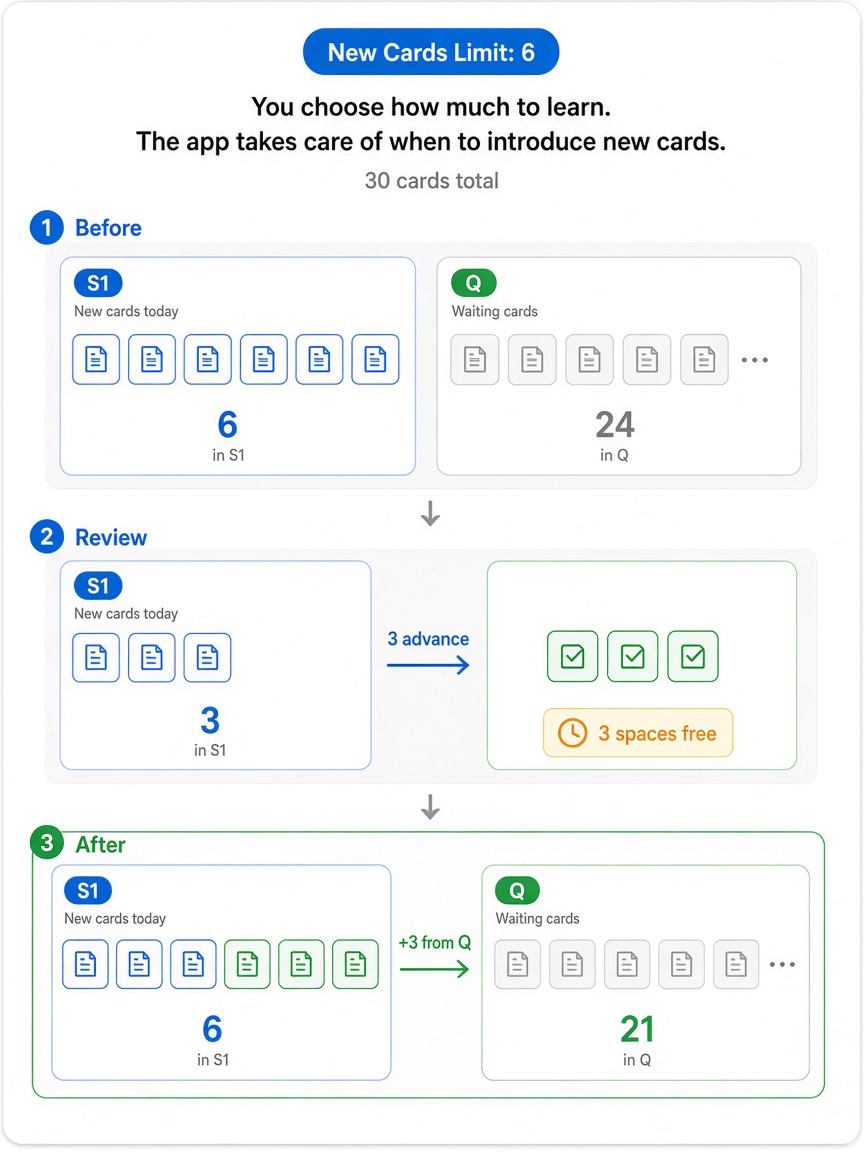
Example: You have 30 flashcards and set New Cards Limit to 6.
- At the start: 6 cards in S1, 24 in Q.
- During a review, if 3 cards advance from S1 to S2, 3 spaces open in S1.
- After the session, MyLeitnerBox moves 3 cards from Q into S1 — not more than the free spaces, and not more than your limit.
- Result: S1 is full again at 6; Q has 21 left.
New cards enter S1 only to fill available spaces, up to your New Cards Limit. The app handles when they appear; you only choose how many you can handle at once.
How to set your New Cards Limit
- Create a new box, or open an existing box and edit it.
- Open Advanced settings.
- Find New cards limit and set the number (for example 6).
- Save. From then on, only that many cards stay active in S1; the rest wait in Q until space opens after reviews.

No manual sorting. No complicated planning. Just focus on learning.
This isn't about cramming for tomorrow's exam. It's about a consistent habit and building knowledge over time.
In short: New Cards Limit caps how full S1 can get; Q holds the backlog; after each review, free spaces in S1 are filled from Q automatically.
Quick guide: what the labels mean
| Label | Meaning |
|---|---|
| New Cards Limit | The maximum number of cards you want in S1 at once (default 6). You set this in Advanced settings when creating or editing a box. |
| S1 (Section 1) | The first Leitner section — your active learning stage. New cards enter here when there is space. |
| S2 (Section 2) | The next section after S1. Cards move here when you answer them correctly in S1. |
| Active cards | Cards already in the Leitner sections (S1–S5) that you are learning and reviewing — not waiting in the queue, and not mastered yet. |
| Q (Queued) | Cards waiting to start. They enter S1 automatically after a review session when S1 has free spaces, up to your New Cards Limit. You can also activate them manually from the card menu. |
| Spaces in S1 | Empty slots under your New Cards Limit. If the limit is 6 and 3 cards leave S1, there are 3 spaces — so up to 3 cards can come in from Q. |
| Mastered | Cards that have completed the Leitner path. They are no longer in the regular active queue. |
